/



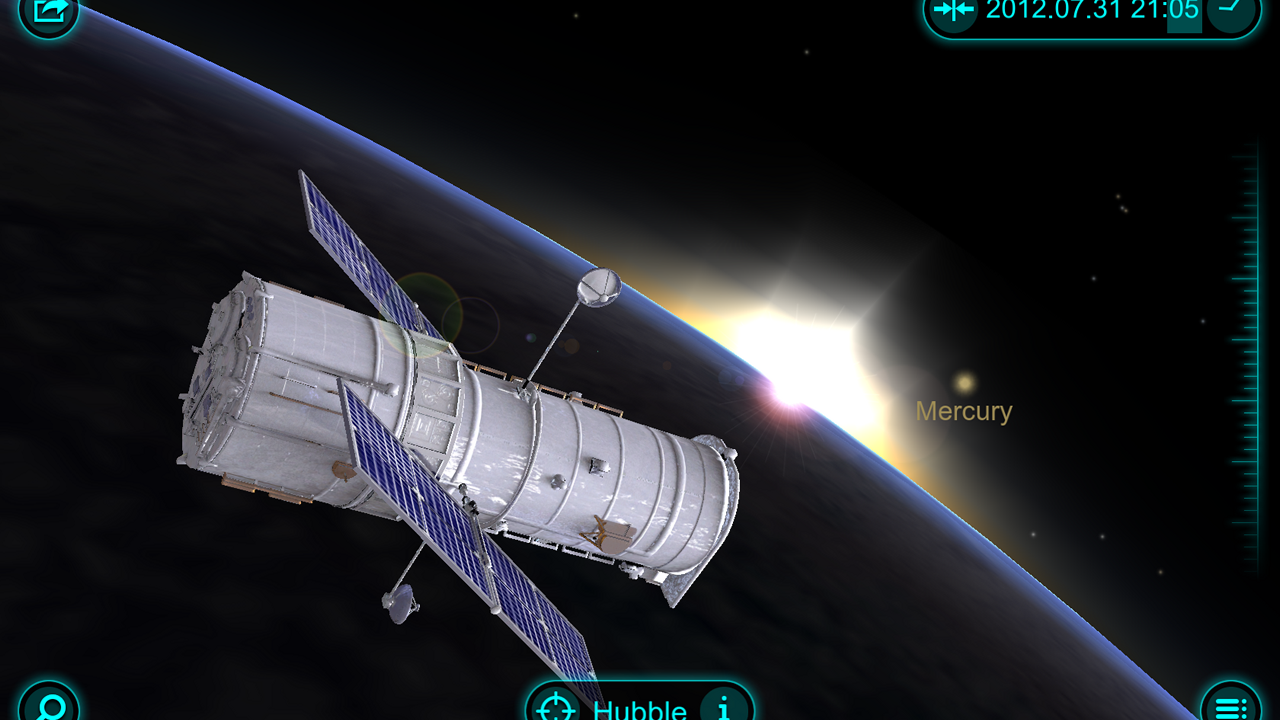


This 3D Solar System model enables you to navigate through space and time, observe all the planets in close-up, learn their trajectories, inner structure, history of their exploration, points of interest and more. Use 3D mode to get a more realistic experience! And zoom out to view and spin the entire Galaxy!
WHAT PEOPLE SAY:
☆☆☆☆☆
I really enjoy this app. It is as informative as it is beautiful. If you enjoy learning about our home, I strongly recommend this app.
by IGC3
☆☆☆☆☆
Simply amazing! With the new update you can see the satellites and zoom out to the milky-way. Bravo! The score is also amazing…
by Mr. JLO
☆☆☆☆☆
The new update really shows where the developer is trying to take this app. I love the new planet size movie and being able to see what's revolving around our Earth.
by Anthony Jr.
WHAT EXPERTS SAY:
Solar Walk for Mac is a full-featured 3D solar system model that allows you to move between stars and planets with your mouse, zoom into check on the planets’ details and read accurate descriptions about them. You can zoom out to view the entire galaxy (well, at least through what’s known of this galaxy), see a planet’s inner structure and learn about its history of exploration. - Federico Viticci, MacStories
Solar Walk allows users to explore the Solar System, as well as the entire Milky Way Galaxy. Notable features include real-time trajectories of the most interesting artificial Earth's satellites, your current position marker, the biggest cities on the globe, and the points of interests on Mars, Venus, and the Moon. -Filip Truta, SoftPedia
MAIN FEATURES:
• GALAXY view - absolutely magical zoom out to view the whole galaxy option.
• SATELLITES - real-time trajectories of the most interesting artificial Earth's satellites
• LOCATIONS - the biggest cities of the Earth, as well as sights of the Moon, Mars and Venus.
• MOVIES - explain basic physical phenomena
• 3D SOLAR SYSTEM model
• INFO about all planets: general info, its name, its mass, radius, distance to the sun, internal structure with the picture and science missions.
• TIME MACHINE - slide the time scale and the sky will start moving accordingly. Tap year, month and time and change them depending on what you want to see, the display will adapt accordingly to show you how planets were aligned at that time.
ATTENTION!
Mind that to use the 3D mode you will need a pair of cyan-red 3D glasses. And, yes, we know that Pluto is no longer considered a planet, but by popular vote it has been added to the Solar System Model.
Initial Release
It's very cool to fly around the solar system using your hands! What's really unique about this app is that there's tons of content and information about the planets, moons, satellites, etc., so you learn a lot as you explore.
4 out of 5 customers found this review helpful
its really good but the controls glitches out a lot and cant zoom in and it crashes a lot
Doesn't work after the upgrade of the SW
It's very cool to fly around the solar system using your hands! What's really unique about this app is that there's tons of content and information about the planets, moons, satellites, etc., so you learn a lot as you explore.
4 out of 5 customers found this review helpful
"Man must understand his universe in order to understand his destiny." - Neil A. Here is a great app that will allow you to fly through our solar system and explore the planets without having to travel light years. At the same time, the bios about the planets are very educational. It's a shame that it doesn't incorporate real pictures from satellites, curiosity or telescopes. As an added bonus, there is an option to view this app in 3D with glasses.
1 out of 1 customers found this review helpful
its really good but the controls glitches out a lot and cant zoom in and it crashes a lot
Doesn't work after the upgrade of the SW
It's a lovely app. I came looking for it after someone told me about how amazing the iPad Solar Walk app was. I've got to ask, though - This version doesn't seem to have an animated videos section, such as the one on the iPad. Is there a reason why not, or is it a feature on the way? Edit: The description says that "movies" are included. I can't seem to find that in the app. Anyone?
Mac OS X 10.7.x and higher
Processor: Intel® CoreTM i3 / i5 / i7
Memory: at least 4Gb
Graphics: NVIDIA GeForce 9400 and higher
600 Mb free Disk Space