12 November 2013 by leapmotiondeveloper
0 Comments
Building a Web-Based Motion Interface with LeapTrainer

Rob O’Leary is an Irish software engineer based in Rome – where he learned that Italian is all about hand movements. Rob became interested in the Leap Motion Controller after seeing its accessible approach and open developer APIs. The latest version of his JavaScript gesture learning and recognition framework lets you upgrade a standard web interface to a motion interface in just a few minutes.

Computer vision is difficult.

Actually, forget that. Computer vision is no problem – you hook up a webcam and boom. The machine can see. However, making a computer understand what it’s seeing is very difficult indeed. The Leap Motion Controller provides a solution. By interpreting the data coming from its cameras, it presents structured information to the computer – telling it there’s a hand here, with fingers there, moving this way and that.

However, while the Leap Motion Controller allows the machine to identify hand movements, for many applications there still remains the challenge of interpreting what those movements actually mean.
Read More

8 November 2013 by leapmotiondeveloper
0 Comments
Using the Leap Motion Hardware with Unity/Web Player

Dave Edelhart is a software engineer in Leap Motion’s web engineering team. This post was originally published on his personal development site at wonderlandlabs.com.

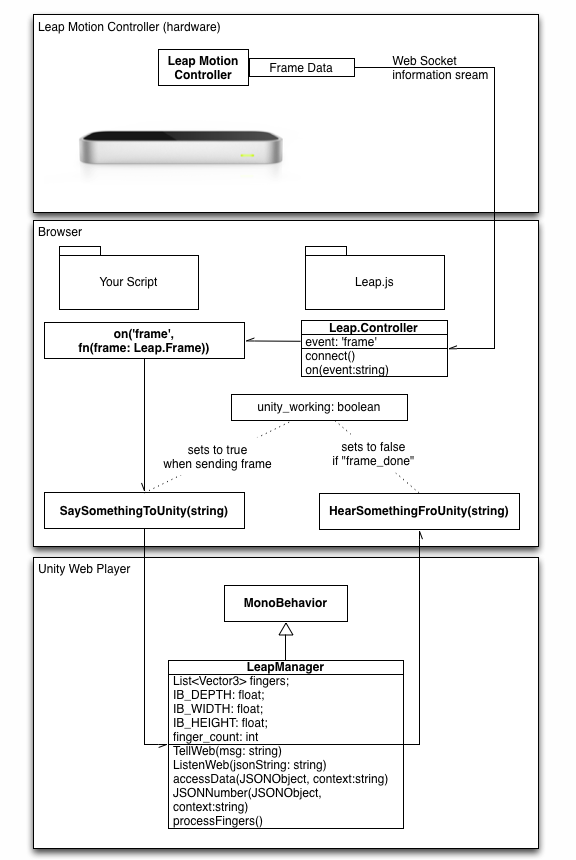
I am working with the Leap Motion Controller and have come across a “soft area” in the API – there is not a direct bridge between the Unity web player and the Leap Motion Controller. This has to do with the fact that the Unity web player is “sandboxed” to prevent its having access to larger hardware, including the Leap Motion Controller.

Fortunately, there is a way around this.

The Leap.js library can communicate with the Leap Motion Controller as a web socket. The documentation describes in detail the API that JS uses to access the device.

The Basic Work Flow

We will be establishing four points of communication between the Unity Player context and JavaScript. Each will have two functions – a “listen” and a “say” function.

These methods will be fed by a Leap.Controller event listener, and will help to limit the flow of information to Unity to that which the Unity player has the processing time to render.

leap-unity-web.png

Read More

15 October 2013 by leapmotiondeveloper
0 Comments
Thinking as a Designer: What’s a Good Leap + Three.js Boilerplate?

As a truly 3D human interface, the Leap Motion Controller opens up a lot of possibilities for developers of all stripes. For modern designers, it means that we have to constantly rethink and tinker with a new way of interacting with computers. It can be frustrating.

At this point, you might expect me to say that it doesn’t have to be frustrating. While you’d be wrong – constantly running into walls is a part of any experimental process – it is possible to lay down a solid foundation. You need to be bold. And you need a boilerplate. So put on your design hat and dive down into the rabbit hole – it’s time to get messy.

Read More