Since we released our cross-promotions feature, several developers have taken advantage of this powerful tool to create trial versions of their apps in the Airspace Store. To help you get started, I’ve written a quick sample that integrates the Cross-Promotions API into apps. It’s basically a single GET request – your app simply parses the JSON that it receives back to see if the cross-promoted app is active, and if it is, which URL to direct the user.
Using the Leap Motion Hardware with Unity/Web Player
Dave Edelhart is a software engineer in Leap Motion’s web engineering team. This post was originally published on his personal development site at wonderlandlabs.com.
I am working with the Leap Motion Controller and have come across a “soft area” in the API – there is not a direct bridge between the Unity web player and the Leap Motion Controller. This has to do with the fact that the Unity web player is “sandboxed” to prevent its having access to larger hardware, including the Leap Motion Controller.
Fortunately, there is a way around this.
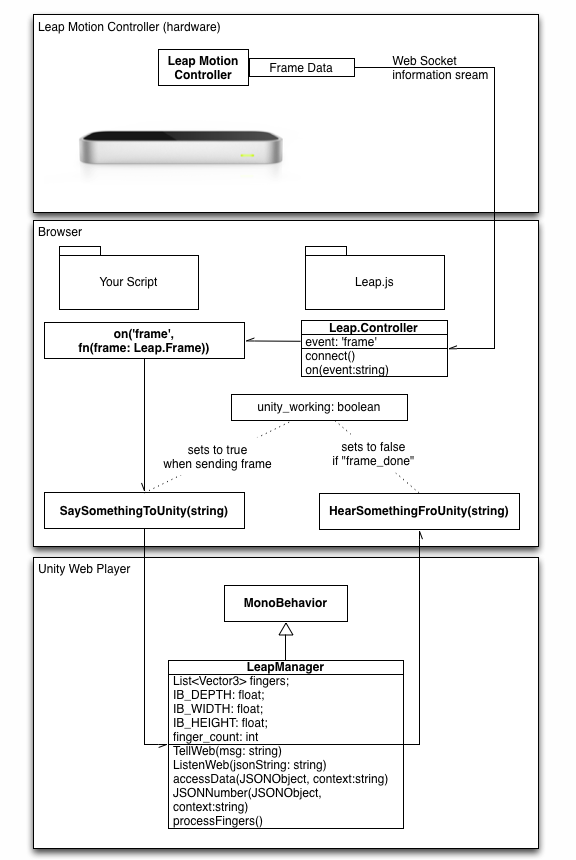
The Leap.js library can communicate with the Leap Motion Controller as a web socket. The documentation describes in detail the API that JS uses to access the device.
The Basic Work Flow
We will be establishing four points of communication between the Unity Player context and JavaScript. Each will have two functions – a “listen” and a “say” function.
These methods will be fed by a Leap.Controller event listener, and will help to limit the flow of information to Unity to that which the Unity player has the processing time to render.