Showing all posts tagged: Leap Motion

3D Interactive Art Meets Social Media

What if social media was art? At Toronto’s Nuit Blanche in October, the designers at Forge Collective revealed their answer to this provocative question with interactive art installation Connexion Point. In the video below, you can see how complete strangers were able to make connections and create a dynamic digital community – exploring stories through Leap Motion interaction.

Once the sun went down, Connexion Point’s visitors used a mobile web app to share meaningful stories about themselves and choose a unique color. This generated a glowing avatar, which would ascend into a colorful world of geometric shapes, joining the avatars of others who visited the installation.

Standing before podiums embedded with Leap Motion Controllers and facing Connexion Point’s projected display, visitors then captured the free-floating avatars using circular gestures. As the world slowly populated over the course of Nuit Blanche, visitors were able to collect avatars and take them home – creating random collections of stories from strangers.

In this way, the creators of Connexion Point were able to bring people together with personal stories, rather than the torrent of noise that plagues conventional social media. Along with the event video, Forge Collective also documented the creative process behind Connexion Point, revealing a sneak peek into their process and highlighting the installation’s functionality. According to the creators:

As the Leap Motion technology is relatively unknown in the realm of public art, using the controller allowed us to create a bit of magic. It elevated the experience beyond that of a touchscreen, and by incorporating it into a podium, we were able to further that magical experience.

The ease of integration with our code also made these devices the perfect fit for our project. Also, most large-scale installations are touch-based – where participants have to stand too close to the screen, losing the impact of the piece as a whole.

With recent installations ranging from forests to graffiti, artists around the world are exploring the possibilities for touchless interaction. By breaking down the barriers between people and their devices, the Leap Motion Controller allows people to forge creative, emotional connections through technology – reaching into virtual worlds with no obstacles or distractions.

What sorts of virtual worlds would you like to explore with Leap Motion control? Let us hear your thoughts @LeapMotion and on our Facebook page.
Welcome to the New Airspace Store

image

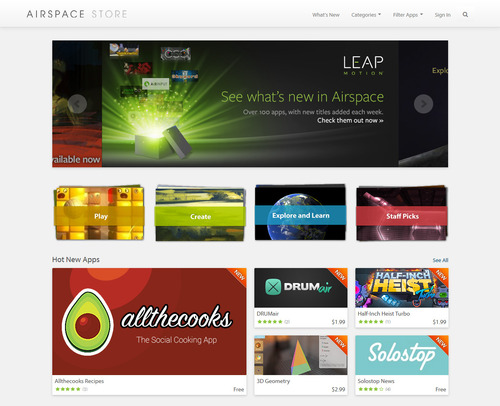
Earlier today, we launched a major update to the Airspace Store, with streamlined navigation and a variety of new features. It’s never been easier to explore, discover, and download the latest apps for the Leap Motion Controller. The new features include:

Easy Navigation. The main menu is now on top, allowing fast access to the latest apps, categories, app filtering, and effortless search.

Seamless Browsing. When you hover above a tile, the app tagline will appear to give you a brief description of the app – so you can instantly learn more about an intriguing title. We’ve also streamlined the appearance of app pages to make them easier to scroll through and read.

App Collections. We’ve created several Collections that bring together groups of apps based on themes like Play, Create, Explore and Learn, and Staff Picks. Each collection offers the chance to discover something new to fit your interests, so watch for new collections over time.

Share Buttons. Want to let your friends know about your favorite game? We’ve made it easier to share app links through Facebook, Twitter, Google+ and email with share buttons on app pages.

What do you think of the newly redesigned Airspace Store? Any suggestions for our new Collections feature? We’d love to hear your thoughts – post on our community forum thread, tweet us @LeapMotion, or post on our Facebook page.

Free Game Trial + 5 New Apps

Get ready to fly through an alien multiplayer world, unravel a tangled puzzle, or knock down cube creatures with the latest apps in the Airspace Store. This week, we have four new games, and an RSS reader with Leap Motion control. Plus, download the free trial version for the sequel to Boom Ball – one of the most popular games in Airspace.

Boom Ball Adventures

The battle against the cube creatures of Crebos has only begun. Dual-wield paddles and lasers, juggle multiple balls, solve puzzles, and travel to 5 exotic locations. Boom Ball Adventures is available for Mac and Windows, and you can try the first 7 levels for free. Get the app »

Volantes

Take the latest futuristic journey from the creators of Telekinetic. Free for Mac and Windows, Volantes places you in control of a ship flying through a competitive multiplayer world. Challenge your friends, capture bases, and shoot down enemies. Get the app »

Ravel

Ravel is a unique puzzle for Windows that you must untangle so that none of the lines intersect. While it’s easy at first, you’ll be surprised to discover how challenging a few dots and lines can be. Get the app »

Half-Inch Heist Turbo

Featuring old-school graphics and a hand-crafted soundtrack, Half-Inch Heist Turbo for Windows is an arcade-style test of skill and endurance. Fight off deadly swarms of enemies in your quest to recover a priceless diamond. Get the app »

Solostop

Discover your favorite news and media with the Leap Motion Controller. Solostop is a free RSS reader for Mac and Windows that lets you choose from over 25 different feeds, including major news sources and blogs. Get the app »

Video: How Autodesk Reaches into New Worlds of 3D Design

We live in a designed world – where form and function are woven together into our everyday lives. From computer animation and architecture to complex machines and tiny gadgets, much of our world is conceived in 3D design programs like Autodesk Maya before it takes physical shape.

Within this 3D space of pure design, industry professionals are using the Leap Motion Controller to push past the flat interface to design and manipulate models. In the video below, you can see how the Autodesk Maya plugin in the Airspace Store works with Leap Motion for a unique design experience:

By augmenting the traditional mouse and keyboard, the Leap Motion Controller gives designers the ability to reach into their design space and play with its contents. They can grab, push, pull, and mold their creations into new forms and shapes. This ability unlocks new possibilities for 3D design – adding a new level of reality and flow to the virtual spaces where they bring their ideas to life.

“When I found out that you can track all your fingers, that’s pretty amazing. You actually have more control,” says Landis Fields, a visual development artist at a major film digital effects studio. “When you start using it, you quickly realize how sensitive it is. Things that you’re thinking in your mind can happen so much faster.”

image

All around the world, designers and artists are using 3D tools like Autodesk Maya to create and mold their designs with Leap Motion interaction. What would you like to create? Let us know on Facebook and Twitter.

6 New Games in the Airspace Store

Along with playing and learning, games are an amazing way to tell stories. With the 6 newest titles in the Airspace Store, you can stretch your mind, enjoy classic games of hand-eye coordination, or explore a unique photographic experience through dreams.

Dots

Inspired by traditional brain-training games, Dots for Windows challenges you to draw unique shapes in a single gesture – without drawing over the same lines twice. Want to try a free version first? You can download Dots Trial before buying the full app. Get the app »

TRAUMA

Experience the dreams of a young woman who survives a car accident in this award-winning indie game for Mac and Windows, recently adapted for the Leap Motion Controller. Discover different aspects of her identity by using gestures to interact with the dreamscape. Get the app »

Chuck Out

image

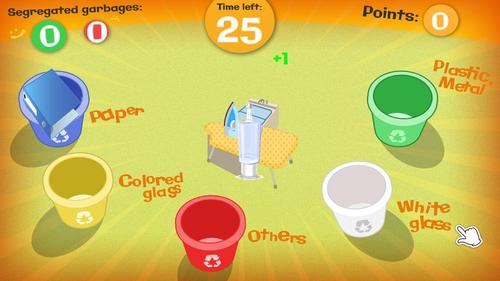
Chuck Out is a free Windows game that tests your recycling knowledge in a fast-paced race against the clock. Catch flying garbage, find the right can, and toss it in – before your time runs out. Get the app »

Darts Party

Test your dart-throwing skills with this classic pub game, now available with Leap Motion control on Mac and Windows. Darts Party features single and local multiplayer modes. Get the app »

GeoCrazy

Explore the globe and stretch your knowledge of world geography and history with this educational game for Windows. Get the app »

Cueb

Take your pool game to the cosmos with Cueb, a free physics-based 3D cue sport for Mac and Windows suspended in deep space. Strike planets into portals with your radioactive Quasar until they all disappear. Get the app »

New Features in Airspace Home

Today, we rolled out version 1.0.9 of the Leap Motion software, with several changes that will make it easier for you to access, download, and enjoy Leap Motion apps. Here are some of the new features available in the latest update:

6 Additional Languages. To help make Airspace Home feel comfortable and accessible to more people around the globe, we’ve added localizations for German, Spanish, French, Japanese, Portuguese, and Simplified and Traditional Chinese.

New Search Feature. With 125 apps currently in the Airspace Store, keeping track of all the apps in your Airspace Home can be tricky. The latest version of Airspace Home includes search – simply start typing the name of an app to find it quickly.

Easy App Management. We’ve added buttons that let you download all of your apps at once, cancel all pending downloads, or update all apps – so you have more control over your downloads and updates than ever before.

Better Trash Behavior. When you move apps to the Trash, they’ll disappear from the main app area of Airspace Home. You’ll still be able to restore them from the Trash.

Minor Fixes. We’ve also made a number of stability and bug fixes, startup performance improvements, and other small tweaks to streamline your Airspace Home experience.

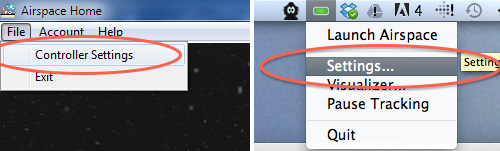
To upgrade now to the latest version of Airspace Home:

Windows: Access “Controller Settings” from the Airspace Home menu (below left)
Mac: Access “Settings” from the Leap Motion menu (below right)

image

From there, click on “Check for Updates” (see below). We recommend that you have Airspace Home set to automatically check for updates, so you can enjoy the most up-to-date software.

image

Staff Picks: 5 Games for Leap Motion

With all the great games in the Airspace Store, it can be hard knowing where to begin. This week, we asked our colleagues around the office to weigh in with their favorite games for Leap Motion. Here’s what they had to say:

Suspect in Sight!

Sortee

image

Blue Estate Prologue

image

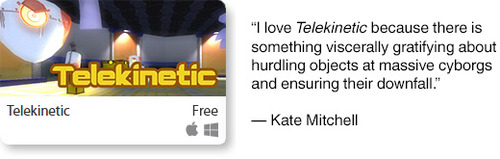
Telekinetic

image

Derigo

image

What’s your favorite app in Airspace? Let us know @LeapMotion or on our Facebook page.

Electronic Musician Creates Leap Motion Theremin & Effects Machine

From live virtual orchestras to distorted pianos, we’ve seen lots of musicians reimagine how they create sounds with the Leap Motion Controller. Recently, Long Beach musician Rahfee Zahkee incorporated our 3D interactive technology alongside an unusual mashup of devices, including customized video game controllers, dance pads, and wireless joysticks.

Based in Long Beach, California, Zahkee is a controllerist – a musician who creates and remixes music using his own custom musical rig. His shows feature a blend of trip hop, dubstep, house, and experimental electronica. Here’s a video of Zahkee in action earlier this year:

At his recent shows, Zahkee has been using the Leap Motion Controller as a virtual theremin and effects machine. In this next video, you can see him playing an invisible hand-activated turntable:

Since then, with the music apps GecoMIDI and AirMIDI, he’s configured the Leap Motion Controller to convert gestures into MIDI signals, which can be mapped to various triggers and knobs. Now he has a touchless turntable with the power to trigger filters and effects, scroll through libraries, and select songs without breaking his flow.

Instead of replacing devices that he can touch, Zahkee says, the Leap Motion Controller lets him explore other possibilities – and surprise his audience with something they’ve never seen before.

The ability to control music within the air can be very expressive in comparison to traditional, tactile-based controls, while saving precious DJ table real-estate space. Its ability to control with very accurate gestures can be useful as a production tool, and its novel performance approach can be entertaining for any crowd.

People react to new DJ technology in many different ways, mostly positive. When I use the Leap Motion Controller, I always get some weird looks when I first start to use it. But as people start figuring it out in relation to the sound, they get up close and love to watch. Sometimes they even try it themselves.

What’s next for live musical performance and the Leap Motion Controller? Let us hear your thoughts on Facebook and Twitter.

Immersive “Holodeck” Classroom with Leap Motion Control

At Ohio University’s Athens campus, there’s a room where students can travel virtually anywhere on Earth. Popularly known as the “Holodeck,” it uses projectors, Google Earth, and the Leap Motion Controller to generate 3 interactive walls that create the illusion of standing in cities around the world – and much more. Check out this video of the Holodeck in action:

The Holodeck is part of an experimental lab space where teachers test out new ways to help students learn languages. Created by a group of linguists at Ohio University’s Language Resource Center, it allows them to feel immersed in the places where these languages are spoken. Despite having no formal technology background, the team built the Holodeck by integrating the Leap Motion Controller with 3 projectors and a MaKey MaKey kit.

Besides exploring cities with Google Street View, the Holodeck has been used for everything from a IMAX style chalkboard to Chinese calligraphy practice. Some students are even using a zombie apocalypse mod for Minecraft as a creative foundation for their class essays.

image

By reaching above the Leap Motion Controller, students can make huge changes in the environment with tiny actions – interacting with learning materials on a life-sized scale. Jeff Kuhn, a visiting lecturer at the Center, envisions the Holodeck as a new way of reaching students through hands-on experiences:

We like to say our goal is to create the impossible for as cheap as possible, so we’ve hobbled the Holodeck together with parts we had lying around. The Holodeck shows what is possible in the classroom with readily available parts, software, and imagination. Everything we used is either already in classrooms or easily purchased.

Being able to move around a space and seemingly interact with the walls around them gets the students engaged at a level sitting at a desk does not. There is a power to doing something while you learn that is missing from sitting passively.

We see the Airspace Store as being the bridge to other classrooms. We have already heard from the medical college about coming in to try out Cyber Science - Motion and Molecules. In education, we talk about flow, which is engagement at a level where you lose track of time and space as you are fully invested in the activity. Just because we are in a classroom, we don’t need to be bound to that classroom space.

The Holodeck is continually in development, and we can’t wait to see what comes next. What sorts of learning possibilities can you imagine with a Leap Motion-enabled immersive environment? Let us know on Facebook and Twitter.

3D Printer Finger Paintings with Leap Motion

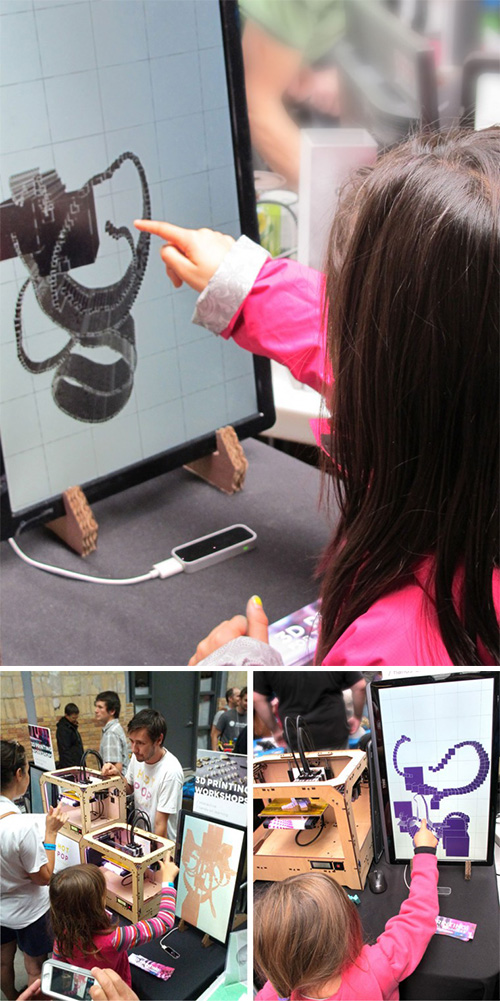
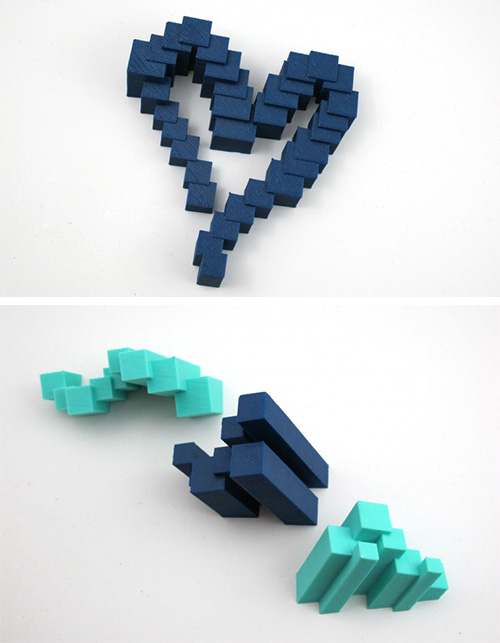
Wave your fingers, paint in the air, and watch your creation appear from nowhere – like magic before your eyes. Last month, at Toronto’s Mini Maker Faire, visitors moved their hands above a Leap Motion Controller to create 3D drawings that appeared instantly on a screen. A short time later, thanks to a 3D printer, their drawings came to life as plastic sculptures.

Created by the designers at Hot Pop Factory, the Maker Faire exhibit brought people of all ages together to experiment with the latest 3D technologies. In this video, you can see little kids reaching out to experience the power of Leap Motion interaction:

By using the Leap Motion Controller to break down the barriers between the Maker Faire visitors and their designs, Hot Pop Factory hopes to make 3D printing more accessible for everyone. “For 3D printing in particular, the Leap Motion Controller is especially interesting – because unlike a mouse, which moves around on a 2D plane, the Leap Motion Controller is specifically equipped to interpret 3D input,” they wrote on their blog.

“We loved seeing how different people approached the sensor and learned to self-navigate our program on their own terms, bringing their own personality.”

The exhibit drew crowds throughout the weekend, including small children, who often understood intuitively how to play with it. Check out some of their creations below:

image

image

What would you like to create in 3 dimensions with the Leap Motion Controller? Tweet us @LeapMotion or post on our Facebook page.

1 2 3 4 5