Showing all posts tagged: leap motion

Immersive “Holodeck” Classroom with Leap Motion Control

At Ohio University’s Athens campus, there’s a room where students can travel virtually anywhere on Earth. Popularly known as the “Holodeck,” it uses projectors, Google Earth, and the Leap Motion Controller to generate 3 interactive walls that create the illusion of standing in cities around the world – and much more. Check out this video of the Holodeck in action:

The Holodeck is part of an experimental lab space where teachers test out new ways to help students learn languages. Created by a group of linguists at Ohio University’s Language Resource Center, it allows them to feel immersed in the places where these languages are spoken. Despite having no formal technology background, the team built the Holodeck by integrating the Leap Motion Controller with 3 projectors and a MaKey MaKey kit.

Besides exploring cities with Google Street View, the Holodeck has been used for everything from a IMAX style chalkboard to Chinese calligraphy practice. Some students are even using a zombie apocalypse mod for Minecraft as a creative foundation for their class essays.

image

By reaching above the Leap Motion Controller, students can make huge changes in the environment with tiny actions – interacting with learning materials on a life-sized scale. Jeff Kuhn, a visiting lecturer at the Center, envisions the Holodeck as a new way of reaching students through hands-on experiences:

We like to say our goal is to create the impossible for as cheap as possible, so we’ve hobbled the Holodeck together with parts we had lying around. The Holodeck shows what is possible in the classroom with readily available parts, software, and imagination. Everything we used is either already in classrooms or easily purchased.

Being able to move around a space and seemingly interact with the walls around them gets the students engaged at a level sitting at a desk does not. There is a power to doing something while you learn that is missing from sitting passively.

We see the Airspace Store as being the bridge to other classrooms. We have already heard from the medical college about coming in to try out Cyber Science - Motion and Molecules. In education, we talk about flow, which is engagement at a level where you lose track of time and space as you are fully invested in the activity. Just because we are in a classroom, we don’t need to be bound to that classroom space.

The Holodeck is continually in development, and we can’t wait to see what comes next. What sorts of learning possibilities can you imagine with a Leap Motion-enabled immersive environment? Let us know on Facebook and Twitter.
3D Printer Finger Paintings with Leap Motion

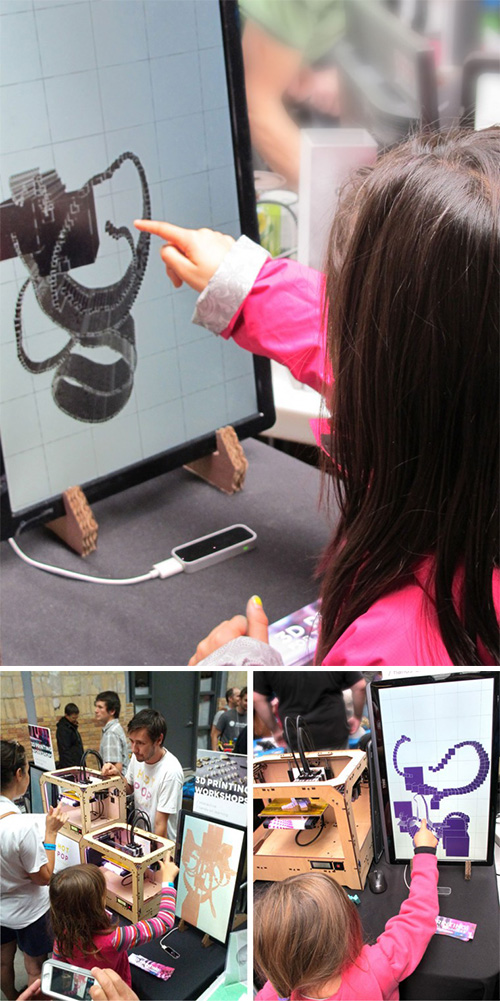
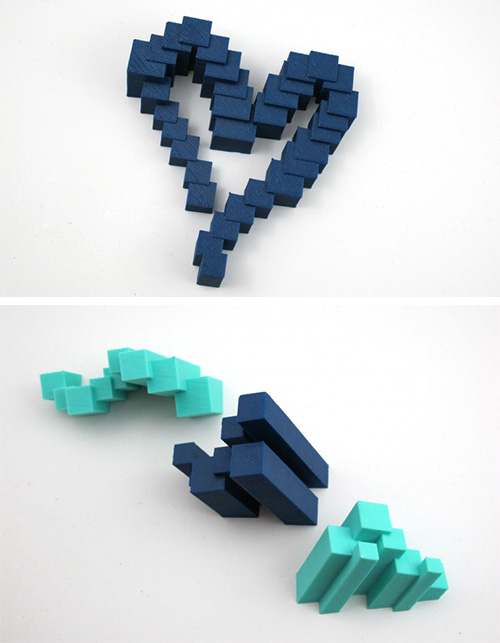
Wave your fingers, paint in the air, and watch your creation appear from nowhere – like magic before your eyes. Last month, at Toronto’s Mini Maker Faire, visitors moved their hands above a Leap Motion Controller to create 3D drawings that appeared instantly on a screen. A short time later, thanks to a 3D printer, their drawings came to life as plastic sculptures.

Created by the designers at Hot Pop Factory, the Maker Faire exhibit brought people of all ages together to experiment with the latest 3D technologies. In this video, you can see little kids reaching out to experience the power of Leap Motion interaction:

By using the Leap Motion Controller to break down the barriers between the Maker Faire visitors and their designs, Hot Pop Factory hopes to make 3D printing more accessible for everyone. “For 3D printing in particular, the Leap Motion Controller is especially interesting – because unlike a mouse, which moves around on a 2D plane, the Leap Motion Controller is specifically equipped to interpret 3D input,” they wrote on their blog.

“We loved seeing how different people approached the sensor and learned to self-navigate our program on their own terms, bringing their own personality.”

The exhibit drew crowds throughout the weekend, including small children, who often understood intuitively how to play with it. Check out some of their creations below:

image

image

What would you like to create in 3 dimensions with the Leap Motion Controller? Tweet us @LeapMotion or post on our Facebook page.

Surgeons Navigate Medical Images in the Air

During surgery, the ability to navigate medical images like X-rays and MRIs is often essential. But keeping things clean eats up time, as surgeons often have to verbally instruct support staff through the images. The alternative is to remove their gloves, scrub their hands and arms, interact with the images, and scrub back in after touching the computer – a process that can take 10 minutes or more.

Healthcare tech company TedCas offers a natural user interface solution that allows doctors to use their hands in the air to zoom, rotate, and swipe through images. Today they announced an integration with the Leap Motion Controller that’s being tested in 6 hospitals around the world. This video shows how using Leap Motion with TedCas saves time and energy in the operating room – from a cardiac surgeon examining scans of his patient’s heart, to a cancer specialist looking for a brain tumor:

“TedCas allows surgeons to use a natural user interface to save time and have precise control and interaction with the information they need during surgery,” says Jesus Perez-Llano, CEO and co-founder of TedCas. “It’s a critical application for surgeons, and TedCas is excited to integrate Leap Motion to bring a new level of precise motion control technology to the operating room.”

Simon Karger, Associate Director of Surgical & Interventional Business at Cambridge Consultants, agrees that touchless control in the OR is a game-changer:

Delicate surgical procedures can often see surgeons spending eight or even twelve hours in theatre. Complex, often uncomfortable device interfaces and the need for robust sterility management makes these already stressful and complex long procedures even more mentally and physically challenging.

Control interfaces that work in the operating theatre – giving the surgeon control while maintaining their sterility – have always been a challenge. The latest wave of new technologies (like touchless interfaces, gesture control, etc.) have the potential to change this, finally bringing 21st century technology to the hand of the surgeon.

Surgeons around the globe could soon be using TedCas software with the Leap Motion Controller, as trials have already rolled out to 6 hospitals and 2 medical research centers around the world – including Ireland, Spain, Argentina, Chile, Canada, and the United States.

Free Game Exclusive: Blue Estate Prologue Available Now

Load your gun and leap into a gritty mob world with a streak of dark humor. Based on the hit comics series of the same name, Blue Estate Prologue is a new arcade-style first-person shooter for Windows. Designed exclusively for the Leap Motion Controller, the game is now available for $3.99 in the Airspace Store – and as part of our launch celebration, you can download it free for a limited time.

Get the game »

image

In Blue Estate Prologue, you can step into the shoes of trigger-happy mobster Tony Luciano, owner of the Smoking Barrel strip club, as he guns down his enemies. The Silk Brothers gang have abducted Cherry Popz, his best dancer, and he’ll stop at nothing to get her back. Fight your way through outlandish locations that include a burlesque show, a steam bath, and secret doors. Blow away bad guys by pointing at them, take cover by spreading out your fingers, and reload by simply swiping your finger down.

When adapting his comics series to the gaming medium, creator Viktor Kalvachev wanted to tell his characters’ stories in a new way. Along with his colleagues at indie game studio HESAW, he realized that the rail shooter genre – fixing the player’s path through the game world – would allow the edgy personalities and lush visuals of Blue Estate to shine.

“We decided to choose a rail shooter to tell a really fun story,” Viktor says, “where we can place the camera in the right way, we can create moments where you can really feel the characters. Tony Luciano is a good choice of character for the lead role with his sharp tongue and itchy trigger finger. It really is a lot of fun to play and I hope people are going to love it.”

See more of our interview with Viktor here.

The two levels in Prologue take place a year before the events in the comic book, with a full multi-level game to be released next year. Blue Estate Prologue for the Leap Motion Controller is available free for only for a limited time – so take the plunge, stay alive, and let us know about your Mafia mishaps on Facebook and Twitter.

Creating a Hand-Controlled Live Orchestra with Leap Motion

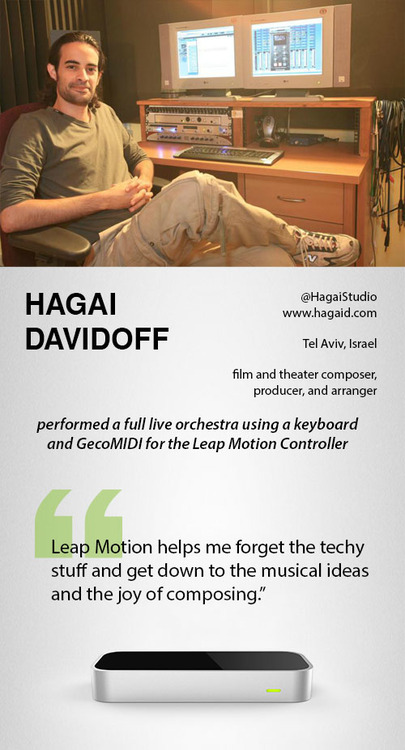
Can one person play an entire live orchestra with only two hands? Using the Leap Motion Controller, GecoMIDI, and a keyboard, Hagai Davidoff was able to dynamically control the flow of a full classical ensemble through natural hand and finger movements in the air. Check out how he did it in the video below.

image

Whether you’re a professional musician working with GecoMIDI, or a music lover who just loves to play a virtual keyboard or jam on air drums, you’ll discover lots of great music apps in the Airspace Store. Want to show us your Leap Motion-powered music video? Tweet us @LeapMotion or post on our Facebook page.

5 Airspace Fan Favorites

With 116 titles and counting currently in the Airspace Store, there are lots of great apps to explore. This week, based on your reviews, we’re highlighting five of the most popular apps. Check out the video demos below for 3 computer control apps, an arcade smashup game and a hand-illustrated puzzle.

Computer Controls

Pointable

BetterTouchTool

image

GameWAVE

image

Games

Boom Ball

image

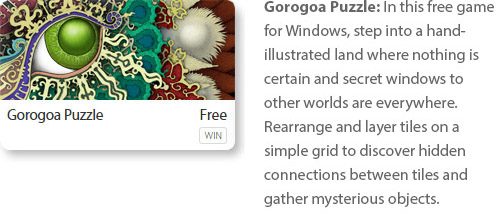
Gorogoa Puzzle

image

What’s your favorite app in the Airspace Store? Let us know in the comments, or give us a shout-out on Facebook and Twitter.

Playing World of Warcraft with GameWAVE

Are you ready to take World of Warcraft to the next level? Today developer Uwyn released a custom gesture mapping file for playing WoW with their popular game control app, GameWAVE. Here’s a quick guide to unlocking the power of GameWAVE so you can get started killing monsters and crushing your enemies with your bare hands. You’ve never played WoW like this.

image

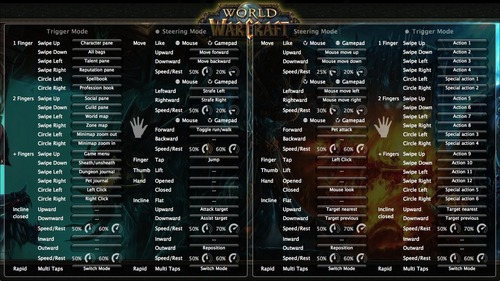
After launching GameWAVE from Airspace Home (your desktop launcher), download the custom WoW file for Windows or Mac from gawshare.com and open it before you begin playing. Now, with the flick of a finger or tilt of a palm, you can take control of your character in World of Warcraft.

Using GameWAVE, you can alternate between steering and trigger modes by making a rapid multi-finger tapping gesture in the air. This lets you quickly switch between triggering one-shot actions and maneuvering your character and the camera view. Some actions are available in both steering and trigger modes, making it easy to stay on your toes in a battle. Below is an outline of the pre-configured controls for the WoW file. Everything can be personally customized and saved for future game play.

Left Hand Controls

Steering Mode: Move your character, run/walk, jump, attack, and assist

Trigger Mode: Access bags, panes, books, maps, menu, and journals, sheath/unsheath your weapon, and left/right click

Right Hand Controls

Steering Mode: Control the camera view, pet attack, left click, mouse look, and switch targets

Trigger Mode: Access actions and special actions, switch targets

Here’s a printable cheat sheet with similar preconfigured commands grouped together for quick reading. (Click for a full-sized version.)

To fully master your GameWAVE experience, don’t forget to tweak the speed and rest settings, which appear as small circles in the app. These control the speed response and the size of your hand’s neutral “resting” position. You can also add custom mappings to trigger macros and other actions – setting off a chain of spells with a simple thumb lift or closed hand.

We’d love to hear how your WoW + GameWAVE setup goes at your next raid or monster battle. Tweet us @LeapMotion or post on our Facebook page with your stories and videos.

Video: Tokyo DJ’s New Album Created with Leap Motion Controller

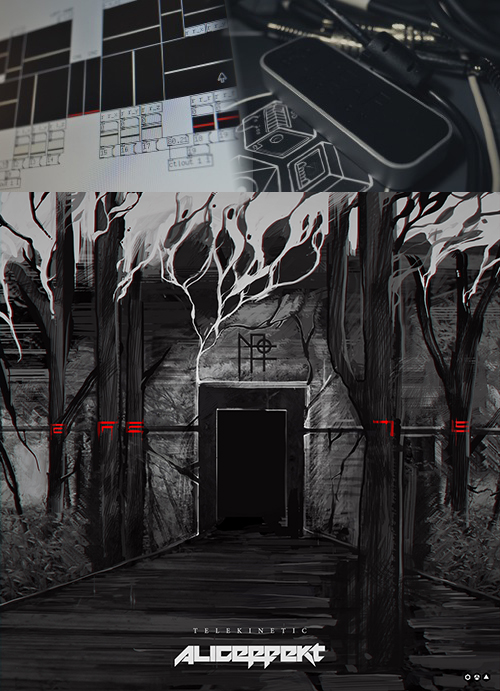
Tokyo-based industrial artist Aliceffekt’s album Telekinetic went live this week, and it’s already getting international coverage for how it was made – it’s the first known album release created with the Leap Motion Controller. By translating hand movements and gestures into retro-futuristic sounds, Aliceffekt created the full 20-minute ambient album using the Leap Motion Controller as his main instrument. He recently used the Leap Motion Controller in a live performance at Tokyo Indie Dance Party, which you can see here:

image

Besides performing as DJ Aliceffekt in Tokyo clubs, Devine Lu Linvega is a digital artist who wears many hats – building apps, designing games, and even inventing a synthetic AI language. Throughout his entire body of work, he keeps one foot in the future and always wants to evolve. During his DJ shows, he found himself getting bored and frustrated.

“I’ve always liked the idea of conducting music, weaving the music in midair,” he says. “This was impossible with the previous tools I had tried. I never really understood the appeal of twisting knobs of laptop shows. I have been scratching my head for a while, trying to get out of this boring image of the modern day music programmer.”

Using the Leap Motion Controller and Ableton Live, Lu Linvega created his own program that would allow him to control the range of a variety of sounds – triggering clips by counting the number of fingers being held out. By moving in three dimensions and controlling tones and clips with simple movements and gestures, he created Telekinetic. Check out this brief clip of his experimental app in action:

However, Lu Linvega says Telekinetic is only a small experiment; it’s a prelude to something much bigger – a whole new way for him to perform and create.

“I want to try something more ambitious for my next shows – involving visuals. I want to have this draw pictures in midair, as well as music. May it be Kinect or Leap Motion or something else, this way of performing – with motion control – is now the only way I shall conduct Aliceffekt shows in the future.”

Telekinetic is available for free download on Lu Linvega’s website, and he also shared his Leap Motion project files for other developers on GitHub. What do you think of Telekinetic – and where will Leap Motion music go next?

Newegg.com Now Selling Leap Motion Controller, Special GameWAVE Offer

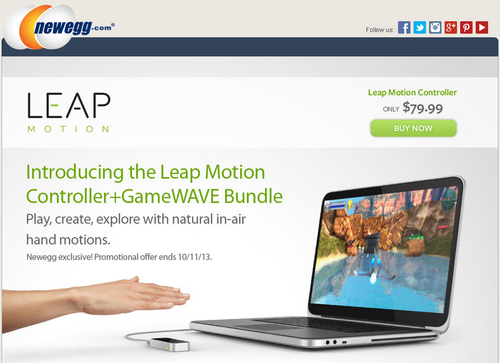
Starting today, the Leap Motion Controller is now available for purchase at Newegg.com. The leading online electronics retailer in the US, Newegg.com is a popular destination for gamers and tech fans. To kick off the launch, all Newegg.com purchases of the Leap Motion Controller by October 11 will receive a free download of GameWAVE.

GameWAVE mods your gaming experience by using natural hand gestures to control virtually anything – including keyboard commands, macros, mouse clicks, and camera movements. Take your gaming into the third dimension by casting spells, moving through the game world, and rotating the field of view with your hands and fingers. In the video below, you can see how one gamer used GameWAVE to cast Warlock spells in World of Warcraft:

Since you can map nearly any command to GameWAVE, it’s compatible with virtually any existing game – from open worlds like Skyrim and Minecraft to first-person shooters like Call of Duty and Borderlands 2. Build your own custom configurations for each game, or download pre-set controls them from the growing collection created by the Leap Motion community. Leap Motion also offers great game apps like Dropchord, Fruit Ninja, and Cut the Rope, making it a perfect match for Newegg.com’s community of casual and hardcore gamers.

To order your Leap Motion Controller with GameWAVE (special offer until Oct. 11), check out newegg.com/leapmotion.

Free New App for Basic Computer Control: HandWAVE

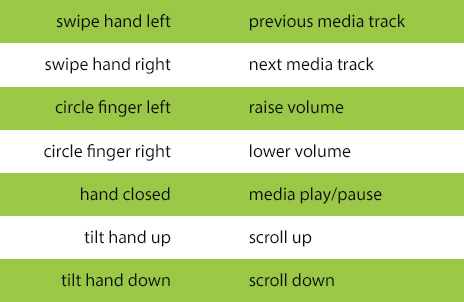
Are you ready to turn up the volume with a spin of your finger? Browse web pages and documents with a hand tilt? Check out HandWAVE, the latest computer control app now available in the Airspace Store. Free for Mac and Windows, HandWAVE is a simple, intuitive gesture-based app that runs in the background so it’s always available.

With HandWAVE, you can control your Windows or Mac computer with simple gestures. While the app is pre-set for media playing and web browsing, you can also configure each gesture to perform a wide variety of actions – including keyboard commands and launching files.

The pre-configured gestures when you download:

image

HandWAVE is built on the same engine as the popular GameWAVE app by Uwyn. It’s remarkably responsive, easy to configure, and has the ability to filter out unintended gestures.

When you first open HandWAVE, a beautiful tutorial helps you get familiar with the gestures, showing how you can use it to control music and video players on your computer and how to tilt your hand up and down to browse through web pages and documents.

Have you tried your hand at HandWAVE? We’d love to hear about your experience – tweet us @leapmotion or post on our Facebook page.

1 2 3 4