Showing all posts tagged: web apps

4 Latest Airspace App Downloads: Building Planes, Subatomic Ions, and More

Want to conquer an ionic storm, build a model airplane, or feed a baby turtle? Today, we’re featuring the three latest games to hit the Airspace Store, plus a creative tool that lets you create vivid sculptures in your browser.

Ione

Ride through a subatomic storm as a lone ione against an endless stream of red dots in this free game for Mac and Windows. Along the way, you’ll collect powerups, gather lives, and see how long you can last before being neutralized.

Download for Mac and Windows »

Turtle Treat

Your turtle is hungry – can you feed him quickly enough to stay alive? Grab and deposit fish eggs into his mouth in this simple Windows game. Gather yellow vitamins, avoid red and black balls, and watch your cute hatchling grow into a healthy adult turtle.

Download for Windows »

Build and Play 3D – Planes Special Edition
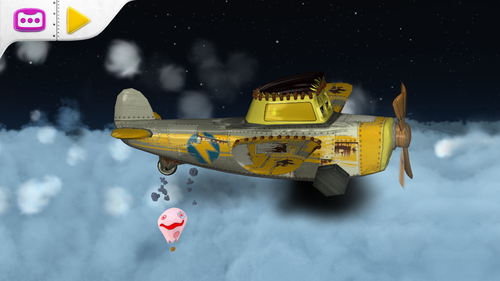
Reach out with your child to build a virtual model airplane with this free construction game for Mac. Designed for young mechanics aged 3 to 6, Build and Play 3D lets you add colorful propellers, wings, windows, and wheels. Slide the pieces together and watch your creation take flight.

Download for Mac »

Leopoly

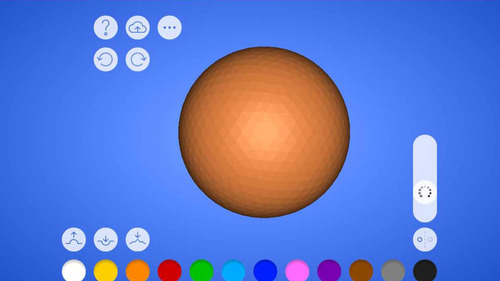
Leopoly is a fun design app that lives in your browser. Create and shape your own 3D models with a variety of sculpting tools, then paint your creation in bright, vibrant colors. To try your hand at Leopoly, make that you’ve checked the “Allow Web Apps” box in the Leap Motion Control Panel (General tab). We recommend Google Chrome for all Leap Motion web apps.

Try it on the web »

3 New Web Experiences and 150+ Apps

This week in Airspace, we’ve nearly doubled our apps since launching in July, with over 150 titles for you to discover. These include 3 brand-new web links, 3 Windows games, and a new standalone app for sound designers and professional musicians.

Web Links

To use Leap Motion on the web, make sure your device’s green light is on, and that you’ve checked the “Allow Web Apps” box in the Leap Motion Control Panel (General tab). We recommend Google Chrome for web apps.

Grooveshark

image

Reach into over 15 million songs and the largest online community of music lovers on the web. With Grooveshark, you can access and create playlists, listen to genre-based radio stations, and control your music with a wave of your hand. Check it out »

PhotoScape

image

Now available on the web, PhotoScape is an immersive browsing experience that puts the world’s photos in your hands. Explore your own photos or browse public image streams – including photography, architecture, design, landscapes, and art. Check it out »

Videogram

image

Experience a new way to browse, discover, and watch YouTube videos. Videogram pulls the best scenes from each video to create interactive pictorial summaries – so you can explore videos with the same ease and simplicity as photos. Check it out »

Games

Ragdoll Run

image

Compete against the world in this exhilarating free-runner hit for Windows Phone, now available in the Airspace Store for Windows. Customize your ragdoll and access unique abilities with colorful 3D graphics and intuitive, gesture-based gameplay. Get the app »

Whack A Mole

image

Moles have infested your yard – but this time, they mean business. Pound waves of enemies into submission and put out fires with nothing but a boxing glove and watering can. Get the app »

Wingsuit Infinity Flyer

image

Dive into the breathtaking world of wingsuit flying and soar through a challenging obstacle course with Wingsuit Infinity Flyer for Windows. Master the art of flight by flying further and collecting bonuses. Get the app »

Music & Entertainment

WaveWarper

Control sound in real time with WaveWarper, a standalone music app that lets you combine and loop up to six sound layers to create a single dynamic file. From there, you can use your Leap Motion Controller to create custom whoosh, Doppler, and passby effects. Get the app »

New Airspace and Web Apps: September 4, 2013

This week in Airspace, take to the skies in a hang glider or run your hands through a peaceful pool of water. In the new browser-based game HelloRun, you can fly through the winding corridors of a spaceship. Plus, we’ve made it easier for you to discover the latest apps in the Airspace Store with our What’s New category.

Games

image
Joca - The Handglider
: Dodge obstacles, collect coins, and soar through the air with Brazilian developer Mocs’ new game for Mac and Windows. You can fly through different challenges, unlock new gliders, and control your speed with ease.

image
PWN9: With this new Windows game from Oliver Noelting, you can challenge your friends and family in a quest for retro-style supremacy. Hit the oncoming balls with your hand-controlled paddle and score points as they zip past your opponent. Every hit makes a ball split into two balls, so be ready for a full-scale barrage.

Experimental

image
Water Waves: Dip your hands into this tranquil screensaver for Windows from Atra Labs. Poke through the water, draw shapes, and play with the waves. When you need some time for quiet reflection, Water Waves also works as a stand-alone application.

Web Apps

image
HelloRun: Speed through pulsing passages and narrow doorways to rack up points and see how long you can last. To get started with this browser-based game:

  • we recommend Google Chrome
  • make sure you’ve checked the “Allow Web Apps” box in the Leap Motion Control Panel (General tab)
  • when you open the game, go to “Settings” and select “Connect Leap Motion”
  • once you’ve calibrated, click anywhere in the game to begin

What’s New?

Finding the latest apps in Airspace is easier than ever with our What’s New category, where you’ll see the latest 12 titles added to the Airspace Store.