Showing all posts tagged: world of warcraft
Are you ready to take World of Warcraft to the next level? Today developer Uwyn released a custom gesture mapping file for playing WoW with their popular game control app, GameWAVE. Here’s a quick guide to unlocking the power of GameWAVE so you can get started killing monsters and crushing your enemies with your bare hands. You’ve never played WoW like this.
After launching GameWAVE from Airspace Home (your desktop launcher), download the custom WoW file for Windows or Mac from gawshare.com and open it before you begin playing. Now, with the flick of a finger or tilt of a palm, you can take control of your character in World of Warcraft.
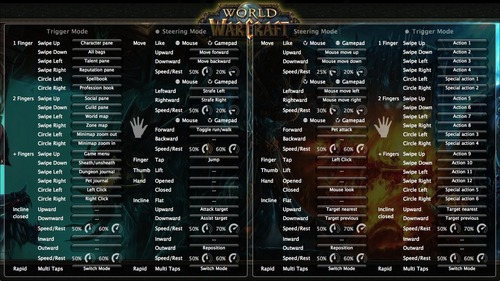
Using GameWAVE, you can alternate between steering and trigger modes by making a rapid multi-finger tapping gesture in the air. This lets you quickly switch between triggering one-shot actions and maneuvering your character and the camera view. Some actions are available in both steering and trigger modes, making it easy to stay on your toes in a battle. Below is an outline of the pre-configured controls for the WoW file. Everything can be personally customized and saved for future game play.
Left Hand Controls
Steering Mode: Move your character, run/walk, jump, attack, and assist
Trigger Mode: Access bags, panes, books, maps, menu, and journals, sheath/unsheath your weapon, and left/right click
Right Hand Controls
Steering Mode: Control the camera view, pet attack, left click, mouse look, and switch targets
Trigger Mode: Access actions and special actions, switch targets
Here’s a printable cheat sheet with similar preconfigured commands grouped together for quick reading. (Click for a full-sized version.)
To fully master your GameWAVE experience, don’t forget to tweak the speed and rest settings, which appear as small circles in the app. These control the speed response and the size of your hand’s neutral “resting” position. You can also add custom mappings to trigger macros and other actions – setting off a chain of spells with a simple thumb lift or closed hand.
We’d love to hear how your WoW + GameWAVE setup goes at your next raid or monster battle. Tweet us @LeapMotion or post on our Facebook page with your stories and videos.