Showing all posts tagged: gaming

Playing World of Warcraft with GameWAVE

Are you ready to take World of Warcraft to the next level? Today developer Uwyn released a custom gesture mapping file for playing WoW with their popular game control app, GameWAVE. Here’s a quick guide to unlocking the power of GameWAVE so you can get started killing monsters and crushing your enemies with your bare hands. You’ve never played WoW like this.
image

After launching GameWAVE from Airspace Home (your desktop launcher), download the custom WoW file for Windows or Mac from gawshare.com and open it before you begin playing. Now, with the flick of a finger or tilt of a palm, you can take control of your character in World of Warcraft.

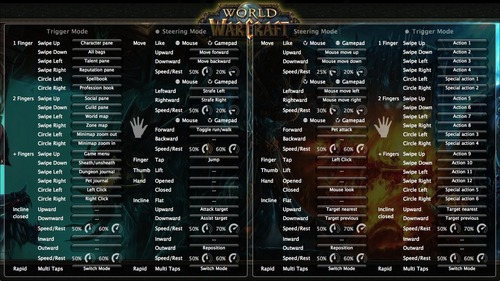
Using GameWAVE, you can alternate between steering and trigger modes by making a rapid multi-finger tapping gesture in the air. This lets you quickly switch between triggering one-shot actions and maneuvering your character and the camera view. Some actions are available in both steering and trigger modes, making it easy to stay on your toes in a battle. Below is an outline of the pre-configured controls for the WoW file. Everything can be personally customized and saved for future game play.

Left Hand Controls

Steering Mode: Move your character, run/walk, jump, attack, and assist

Trigger Mode: Access bags, panes, books, maps, menu, and journals, sheath/unsheath your weapon, and left/right click

Right Hand Controls

Steering Mode: Control the camera view, pet attack, left click, mouse look, and switch targets

Trigger Mode: Access actions and special actions, switch targets

Here’s a printable cheat sheet with similar preconfigured commands grouped together for quick reading. (Click for a full-sized version.)

To fully master your GameWAVE experience, don’t forget to tweak the speed and rest settings, which appear as small circles in the app. These control the speed response and the size of your hand’s neutral “resting” position. You can also add custom mappings to trigger macros and other actions – setting off a chain of spells with a simple thumb lift or closed hand.

We’d love to hear how your WoW + GameWAVE setup goes at your next raid or monster battle. Tweet us @LeapMotion or post on our Facebook page with your stories and videos.
Try Your Hand at these Apps for OS Interaction

Over the last two weeks, lots of people have taken their #FirstLeap with OS interaction using the Leap Motion Controller. While traditional interfaces are designed for 2D interactions, our developers are exploring new ways of bringing 3D interactivity to your desktop.

At Leap Motion, we want to enable you to choose your favorite OS apps to use. We’ve been excited to see the debut of three new OS interaction apps on the Airspace Store since our launch, and we expect more on the way. Here are the five apps currently available that allow you to reach out and take control of your computer.

image

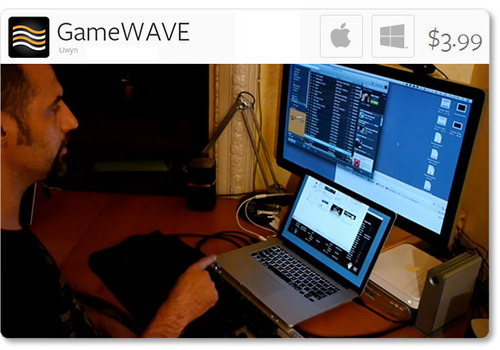
Uwyn’s GameWAVE, available for Mac and Windows, recently debuted in Airspace. It allows you to completely control keyboard and mouse-based video games, as well as your OS. Assign actions to different gestures and make them correspond to what your favorite games are expecting.

Highlights

  • alternate between trigger and steering modes
  • 20 distinct swipe and circle gestures, 6 continuous movement
  • directions, and several other configurable gestures
  • wide variety of supported actions that can be mapped to gestures

image

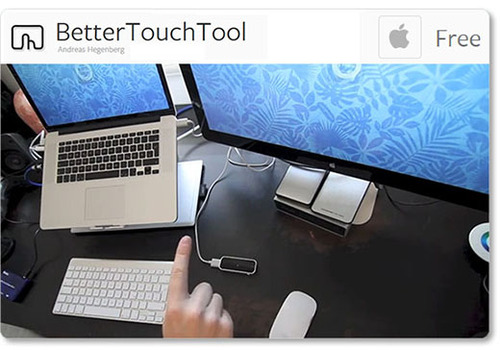
One of the highest-rated apps on the Airspace Store, Andreas Hegenberg’s BetterTouchTool is a highly customizable free app for Mac OS X. It currently supports 25 gestures, which can be mapped to keyboard shortcuts and your mouse.

Highlights

  • works with the Leap Motion Controller, Apple’s Magic Mouse, Macbook Trackpad and Magic Trackpad
  • create application-specific gestures and global gestures
  • disable interaction for specific apps

Created for OS X by AppCannon Software, Swish allows you to easily switch between different apps, control your music, and bind gestures to keyboard shortcuts and other pre-defined actions.

Highlights

  • music options include changing system volume and selecting a song to play
  • easily accessible App Switcher
  • gesture sensitivity options
  • beta Cursor Control system

imageimage

The Touchless apps for Mac and Windows represent a first step towards bringing Leap Motion control to traditional OS interaction. Available for free on the Airspace Store, they allow you to browse the web, open applications and documents, and control menu items.

Highlights

  • click by pointing your finger towards the screen
  • scroll by swiping multiple fingers in the air
  • zoom in and out by pinching your fingers

Since launch, we’ve heard lots of constructive feedback about the Touchless apps from the Leap Motion community. We’re thankful for your comments, and our team is continuing to refine the software and improve the Touchless experience. You can join the conversation and let share your thoughts on our OS interaction forum thread.

These five apps are just the beginning, and we can’t wait to see what our developers will build next. We’d like to hear about your experiences with Leap Motion OS interaction, and what you’d like next from our developer community. Let us hear what you have to say on our forum thread.