Pre-order customers: Please verify your order details

As we get ready to ship the Leap Motion Controller out to the world in July, we’re making sure each one goes to the right place. Things might have changed since you placed your pre-order — maybe you’ve moved, or maybe your payment information has changed or expired. We don’t want anything to keep you from getting your device next month.

Today, we began sending out an email to everyone who has pre-ordered a Leap Motion Controller to verify order details. If you’ve pre-ordered yours, please review your information and make any required changes. You can also visit www.leapmotion.com, enter your order number, and make sure your order details are correct. That way, we’ll be able to ship your device without a problem.

If you have changes to your address or payment details, please update your account by July 2 so we can include your order in our first round of shipping. Remember, we’ll only charge your credit card when we ship your device.

FAQ:
Read More

Beta Update: Next Phase Testing

This week we’re rolling out the latest stage of the Leap Motion beta to our early access developer community. Thousands of developers around the globe will soon be testing the consumer experience to help smooth the rough edges and hunt for bugs.

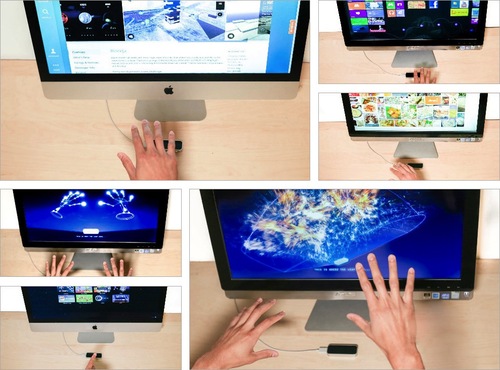
Over the next several weeks, our beta users will be testing Mac and PC operating system interactions, and Airspace, our app discovery platform. Here’s a sneak preview of what you’ll see when the Leap Motion Controller begins shipping on July 22.

image

During our beta, testers will be able to access:

  • Mac and Windows OS interaction – They’ll be able to scroll and click with simple finger moves, and Windows users can open and navigate metro apps, like a recipe collection or a game, with ease.
  • Airspace Home – The desktop launcher is where all Leap Motion apps will live. This includes other software on the computer that uses a Leap Motion API, like Google Earth.
  • Airspace Store – Browse, buy, and download apps across a wide variety of categories. Users can access the store through Airspace Home.
  • Orientation – Our interactive tutorial, which will run after testers download the Leap Motion software, will help orient them to Leap Motion’s field of view and the zone of interaction when using Leap Motion for the first time.

We look forward to all the feedback from our beta testers, and will keep you posted on our progress.

Inside Leap Motion: Meet Our Software Engineers

It took years to design and build the Leap Motion Controller, and our incredible team of engineers is continually working to maximize its full potential. Over the coming weeks, you’ll meet the amazing people on our software, hardware, and web development teams – the technical wizards who work behind the scenes to bring 3D interaction to the world.

A gathering of Leap Motion’s engineering teams.

Today, we’ll introduce you to some of the people working on the Leap Motion software, which is the true magic behind the device. Earlier this week, we asked some of our software engineering team members to talk about their lives, work, and passions.

1. What’s your vision for the future?

Keith: Basically, we want to advance human-computer interface technology in every arena we encounter. The code we’re writing, and the ideas we’re exploring, will soon be a part of the daily lives of people around the world. Our goal is to push the boundaries of expectation in all areas – from scientific and technological advancement, to inspiring how companies and engineering teams will evolve in the 21st century.

2. When did you first realize the potential of a touchless interface?

Raffi: One day, I was at a shopping mall, waiting to use a floor-plan map you could navigate using a touchscreen. A kid in front of me was eating a greasy hamburger and using the touchscreen at the same time. When it was my turn, I took one look at the grime smeared all over the screen, and thought, “There must be a better way.” So it’s very important to me that we are creating an interface where you don’t have to touch anything.

Read More

Inside Double Fine: Making Their First Leap Motion Game

Game designers around the world have been inspired by the Leap Motion Controller’s incredible speed and accuracy to create games that take advantage of our unique 3D interaction technology. Last week, we caught up with Patrick Hackett – a game designer with popular indie developer Double Fine Productions – about his creative process in developing for the Leap Motion Controller.

Double Fine is widely known for creating quirky, innovative games that capture the public imagination. Their debut app for Leap Motion is the score challenge game Dropchord, which allows you to become a master DJ – dodging scratches, collecting notes, and jamming to an original electronic soundtrack. During our visit to Double Fine’s offices in San Francisco, we were invited behind the scenes to meet some of the amazing people who brought Dropchord to life.

When did you first experience Leap Motion, and what was your initial reaction?

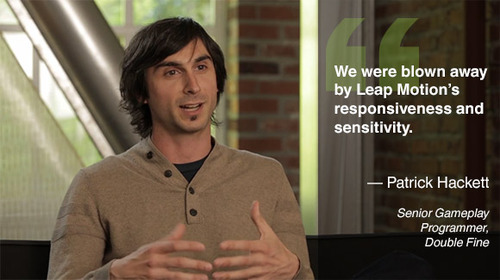
Leap Motion first sent us some controllers in February and I think our initial reaction was the same as everyone who uses it. We were blown away by Leap Motion’s responsiveness and sensitivity. Jeremy Mitchell, one of my colleagues, had it set up at his desk initially and we were fighting over who got to use it next. Both of us ended up taking controllers home and creating demos over the weekend because we were so geeked up to use it.

image

Read More

What Makes a Great Game for Leap Motion?

While new interactive technologies offer near-infinite possibilities for app creation, few things can capture our imagination quite like games. Over the past several months at Leap Motion, we’ve seen hundreds of developers building games in a variety of genres, pushing our 3D interactive technology to the limits. Today, in honor of E3, I’d like to provide some insights on how our developers are transforming the gaming experience.

iVoltage’s 3D platformer Froggle, coming soon for Leap Motion. Take an adventure spanning 120 missions, where you can hop across lily pads, fly on a bird, ride a beetle, or control a jetpack.

There’s no magic formula for building incredible games. But there are a few fundamentals that a great game must accomplish. A great game is something you can play over and over again – something that tests your skills and gives you the thrill of accomplishment. It’s an unforgettable experience.

As the Director of Developer Relations at Leap Motion, I’ve played lots of games developed for the Leap Motion Controller. Over that time, I learned that all great Leap Motion apps, regardless of category, have one thing in common. They all achieve three essential things:

Read More

Inside Leap Motion: Meet the App Review Team

The Leap Motion App Review Team: Matthew, Stephen, Bobby, Michael M., Michael Y., Sam, Collin, Ernest, Shaun

Over the past eight months, our developer community has been building some amazing applications for the Leap Motion Controller. When they’re ready to submit their apps to Airspace, our online app store, that’s when the App Review Team springs into action.

In the first of our Inside Leap Motion series, we talk to Michael Yasko, Senior Manager of Developer Relations & App Review, about his team and their work. They test each app submission and work with developers to improve them – an essential part of our mission to create a magical experience for everyone. Step into the Leap Motion bunker and meet the people who help incredible apps on their way to Airspace.

Read More

A New Movement in Music Creation

At Leap Motion, we’ve been amazed by how many people from around the world have been inspired by the possibilities of our technology. They want to free themselves, and the rest of us, from the current limitations of computing interfaces. Last week, we joined many of these visionaries at the annual SF MusicTech Summit, which brings together some of the biggest names in the music, business, and tech scene together under one roof.

image

Read More

Leap Motion Inspires Digital Painter Jeremy Sutton

Jeremy Sutton, a master digital artist for more than 2 decades, has been using Corel’s Painter Freestyle Beta application for Leap Motion to explore new ways to make art. See how Leap Motion and Corel gives him a wide-open canvas and endless inspiration:

We met Jeremy in Austin, TX back in March during SXSW. He joined us for 3 days at the Leap Motion Experience to demonstrate the new ways he creates art with Leap Motion.

It’s been a couple of months since then, so we checked back in this week with 5 questions for Jeremy:

Why do you enjoy using Leap Motion to create art?

I love both the feel and results of painting in the air with the combination of Leap Motion and Corel Painter Freestyle Beta — it’s like none other. It’s very relaxing and enjoyable to be fluidly moving my hands and fingers through the air to create and control my brush strokes on my digital canvas. It feels like being a dancer, conductor, and magician all wrapped up in one. The results, some of which you can see at http://www.paintboxtv.com/air-painting/ , have a unique, wonderful, and playful quality of line that is different to anything else created in any other medium — digital or traditional. I can still get as much fine detail as I want, but combined with the looseness and serendipity of the 3D motion of my fingers in the air. Painting with Leap Motion really fulfills Arthur C. Clarke’s famous third law: “Any sufficiently advanced technology is indistinguishable from magic.”

Read More

MIT Entrepreneur Students Study Leap Motion

image

Back in October 2012, MIT’s Sloan School of Management selected Leap Motion as their case study company. These entrepreneurial students committed to following and evaluating Leap Motion over the course of their academic year, and I’ve just returned from their final presentations. It was an amazing trip, and I wanted to take this opportunity to thank MIT for their hard work and insights about Leap Motion.

It’s a very cool honor for us at Leap Motion to be selected as a case study project by one of the finest technology schools in the world. Recent companies MIT selected have included Lytro and Groupon. We have been more than happy to endorse the effort by Professor Scott Stern and his assistants and answer their questions over the past year.

Read More

A Sneak Peek into Windows OS with Leap Motion

Today we released a sneak peek of Leap Motion’s Windows functionality, one of the essential features we’re refining for our July 22 launch. This video shows how Leap Motion technology will work easily and seamlessly with Windows OS.

With the Leap Motion Controller, you’ll be able to browse the web and interact with your computer just by moving your hands and fingers in the air. With Leap Motion technology and Windows, you can do everything that’s possible with multi-touch inputs — without actually touching anything. This also means that existing applications in Windows 7 and 8 will respond to your natural hand and finger movements. Soon, we’ll show you how Leap Motion will work with Mac OS X.

With the help of the developer community in our beta program, we’ll continue to refine this OS interaction as well as the innovative apps in Airspace. This program is in place to make sure the Leap Motion experience is what we’ve planned all along: to be the most intuitive, natural, and magical way to interact with your computer and to transform how the world interacts with technology.

If you haven’t already, you can subscribe to our mailing list for updates and news as we continue on our journey together.

3 4 5 6 7