Showing all posts tagged: leapmotion

Try Your Hand at these Apps for OS Interaction

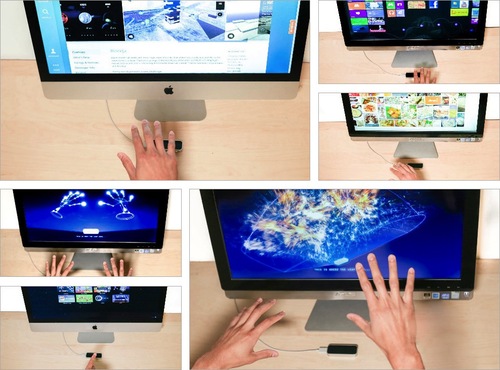
Over the last two weeks, lots of people have taken their #FirstLeap with OS interaction using the Leap Motion Controller. While traditional interfaces are designed for 2D interactions, our developers are exploring new ways of bringing 3D interactivity to your desktop.

At Leap Motion, we want to enable you to choose your favorite OS apps to use. We’ve been excited to see the debut of three new OS interaction apps on the Airspace Store since our launch, and we expect more on the way. Here are the five apps currently available that allow you to reach out and take control of your computer.
image

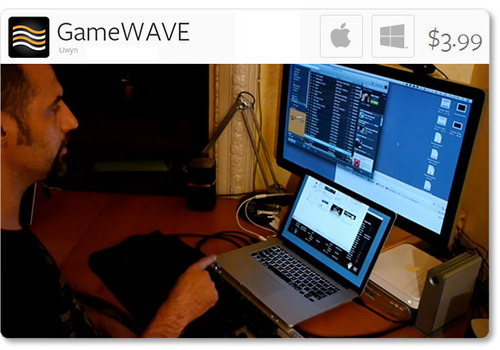
Uwyn’s GameWAVE, available for Mac and Windows, recently debuted in Airspace. It allows you to completely control keyboard and mouse-based video games, as well as your OS. Assign actions to different gestures and make them correspond to what your favorite games are expecting.

Highlights

  • alternate between trigger and steering modes
  • 20 distinct swipe and circle gestures, 6 continuous movement
  • directions, and several other configurable gestures
  • wide variety of supported actions that can be mapped to gestures

image

One of the highest-rated apps on the Airspace Store, Andreas Hegenberg’s BetterTouchTool is a highly customizable free app for Mac OS X. It currently supports 25 gestures, which can be mapped to keyboard shortcuts and your mouse.

Highlights

  • works with the Leap Motion Controller, Apple’s Magic Mouse, Macbook Trackpad and Magic Trackpad
  • create application-specific gestures and global gestures
  • disable interaction for specific apps

Created for OS X by AppCannon Software, Swish allows you to easily switch between different apps, control your music, and bind gestures to keyboard shortcuts and other pre-defined actions.

Highlights

  • music options include changing system volume and selecting a song to play
  • easily accessible App Switcher
  • gesture sensitivity options
  • beta Cursor Control system

imageimage

The Touchless apps for Mac and Windows represent a first step towards bringing Leap Motion control to traditional OS interaction. Available for free on the Airspace Store, they allow you to browse the web, open applications and documents, and control menu items.

Highlights

  • click by pointing your finger towards the screen
  • scroll by swiping multiple fingers in the air
  • zoom in and out by pinching your fingers

Since launch, we’ve heard lots of constructive feedback about the Touchless apps from the Leap Motion community. We’re thankful for your comments, and our team is continuing to refine the software and improve the Touchless experience. You can join the conversation and let share your thoughts on our OS interaction forum thread.

These five apps are just the beginning, and we can’t wait to see what our developers will build next. We’d like to hear about your experiences with Leap Motion OS interaction, and what you’d like next from our developer community. Let us hear what you have to say on our forum thread.
Airspace™ Store Highlights: Music, Games, Creativity, and More

image

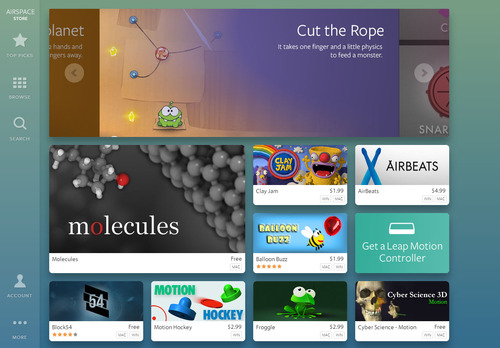
Last week, we showed you a preview of the Leap Motion experience, including Airspace Home and Airspace Store. Today, we’re taking a closer look at some of the amazing apps that you’ll soon be able to use with your Leap Motion Controller. When we launch on Monday, we’ll have about 75 apps – both free and paid – in the store.

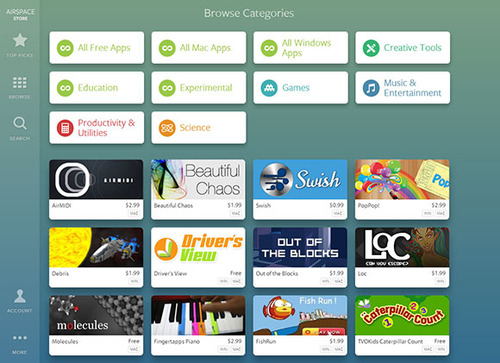
When you enter the Airspace Store, you’ll see our home tile page. If you’d like to filter, you can scroll to the bottom and select to see all free apps, all Windows apps, all Mac apps, or sort by content category. This is only the beginning – we’ll be adding new apps and categories as our developers build them.

image

There’s something for everyone on Airspace – from educational games and immersive visualizer apps to powerful utilities and scientific wonders. Here are just a few highlights that you’ll soon be able to experience first-hand.

image

Unleash your inner artist with apps that open new possibilities for creative expression, digital art, musical performance, and visual presentations. Create captivating compositions with Fantasia Painter or manage your photos with Unbound for Mac.

image

Enhance your photos to make detailed masterpieces or minimally affected compositions with DecoSketch, the geometric effects and drawing suite for professionals and hobbyists. Featuring a diverse collection of brushes and presets, it’s available for Windows and Mac.

image

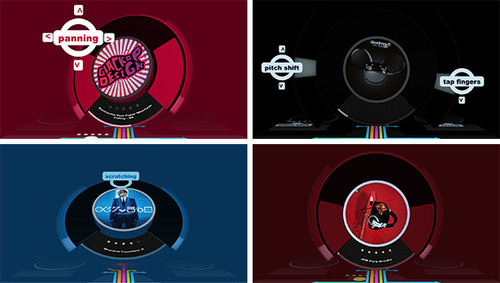
Get into the groove with Leap Motion music and entertainment apps. Create your own electronic music with versatile apps like Geco and Chordion Conductor, or master the rhythmic arts with fast-paced beats and exotic visuals in amazing titles like Dropchord, Beat Bash, and Octorhythm.

image

Intuitively reach in to control track playback, audio effects, and looping with Swoosh for Mac – an iTunes performance companion that simulates vinyl control with that vintage pitch sound.

image

Starting Monday, you can count your way from caterpillar to butterfly with TVOKids Caterpillar Count and think fast about categories with Sortee.

image

Explore animal sounds, practice counting, and even play the piano with Curious Kids for Mac and Windows. Beautiful colors, intuitive motions and appealing graphics will entertain and educate for hours.

image

With an amazing variety of titles, Airspace has delightfully imaginative games for everyone to play and enjoy. Some games, like Cut the Rope and Puddle, cover familiar territory in new ways. Others like Block54, LICHT little adventure, and Boom Ball take you into bold, immersive worlds.

image

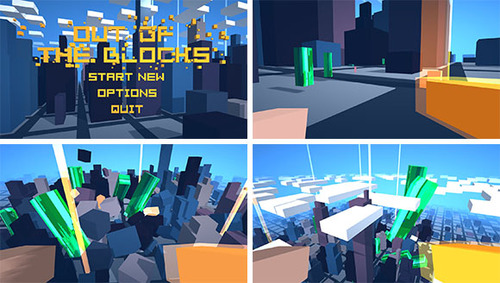
Acquire and tame unimaginable power, defeat the corrupt, and seek the truth in Out of the Blocks for Mac and Windows.

image

3D interactive utilities offer new and better ways to perform everyday tasks. Present pictures with simple gestures using Agatha for Windows and download OS interaction apps.

image

Log into your computer with a simple wave of your hand. By using the measurements of your hand, Unlock creates touch-free biometric authentication for Windows PCs.

image

From the subatomic to the galactic, science apps for the Leap Motion Controller allow you to reach out and grasp the mysteries of our universe. Explore the wonders of the human hand with Powers of Minus Ten, or dissect and assemble a human skull with Cyber Science - Motion.

image

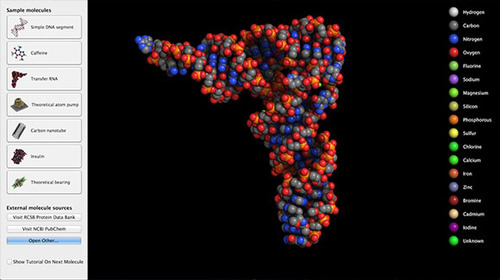
Hold a 3D molecule in the palm of your hand with Molecules for OSX. This open-source molecular visualizer is available for free on Airspace.

image

Push the boundaries of 3D interaction with brand new experiences you’ve never seen before. Create stunning visuals with VIZ.it and Beautiful Chaos.

image

Harness your creative powers with Lotus, a mind-altering audioreactive experience. Free for Windows and Mac, it has 4 interactive musical toys and an amazing, dynamically created soundtrack.

There are only 3 more days until the Leap Motion Controller begins arriving at doorsteps around the world. Once you’ve set up your device, what will be your #FirstLeap?

Behind the Scenes: Leap Motion Shipping

In less than 2 weeks we’re shipping the Leap Motion Controller to more than 150 countries around the world. Amy Purvis, our Supply Chain Coordinator, has been a huge part of the Leap Motion team as one of our first 10 employees.

Although she’s always moving full steam ahead, Amy took some time this week to answer a few questions about getting the Leap Motion Controller out to the world. She also shared some photos she took from a visit to one of our distribution centers.

image

Where are Leap Motion’s warehouses, and where do they ship?

Our distribution center in Brno, Czech Republic, ships to the EU, Middle East, and Africa. They assemble around 7,000 boxes per day. Our warehouse in Nashville, TN ships to North and South America, and they assemble 12,000 boxes per day. In Singapore, our warehouse ships to Asia Pacific and averages about 6,000 boxes per day. We’ve had all our centers assembling boxes for weeks to be ready for July 22 and beyond.

Why can’t we ship to some countries?

Read More

Pre-order Email Update: FAQ

Hello everyone. We’ve heard many questions in relation to the shipping information email we sent to our pre-order customers yesterday. If you have not opened that email, please do so as there is important information related to shipping your Leap Motion Controller next month.

A majority of you have successfully checked, validated and/or updated your information. Thank you for taking a moment to verify your order.

But for the people that have reported issues, we sincerely apologize for the inconvenience. We’re working hard to get back to you through customer support as soon as possible, but it make take longer than usual. In the meantime, we wanted to provide an update and answers to some frequently asked questions. And if you’re trying to update through your phone or tablet, please try your computer instead.

We appreciate your patience and support.

1. The link to update my information is not working.

2. I input my billing information, and am still getting an error message.

  • We have resolved the issue that generated this error for some customers. Please try one more time to update your billing information with the credit card you wish to use. We apologize for the inconvenience.

3. I got an email that you are missing my first and last name – why is that information missing?

  • Our system needs to verify the information in those fields as we need to confirm the correct name in order to ensure shipping. Please check your order information and update if needed. Our apologies for the inconvenience.

4. I got a message that my order’s missing information, but when I check I don’t see anything wrong. What do I do?

  • If you got an email that doesn’t list specific areas to update, please check that everything is fine. We wanted to remind you to double check in case you moved, wanted to use a different card or needed to update your order in any other way.
  • If our email listed specific items to update, but they appear to be in order when you check, please confirm the details are correct on our pre-order page, anyway.

5. Why is my final total different?

  • When you placed a pre-order, we said the shipping was an estimate and we would also charge applicable import fees and taxes. Your current information reflects the final cost Leap Motion will charge when we ship your pre-order.

6. How can I be sure my information is actually correct in the system?

  • Once you have successfully updated your information, you should see a screen like below. You can also double check your information at any time by following the instructions in #1.

Pre-order customers: Please verify your order details

As we get ready to ship the Leap Motion Controller out to the world in July, we’re making sure each one goes to the right place. Things might have changed since you placed your pre-order — maybe you’ve moved, or maybe your payment information has changed or expired. We don’t want anything to keep you from getting your device next month.

Today, we began sending out an email to everyone who has pre-ordered a Leap Motion Controller to verify order details. If you’ve pre-ordered yours, please review your information and make any required changes. You can also visit www.leapmotion.com, enter your order number, and make sure your order details are correct. That way, we’ll be able to ship your device without a problem.

If you have changes to your address or payment details, please update your account by July 2 so we can include your order in our first round of shipping. Remember, we’ll only charge your credit card when we ship your device.

FAQ:

Read More

Beta Update: Next Phase Testing

This week we’re rolling out the latest stage of the Leap Motion beta to our early access developer community. Thousands of developers around the globe will soon be testing the consumer experience to help smooth the rough edges and hunt for bugs.

Over the next several weeks, our beta users will be testing Mac and PC operating system interactions, and Airspace, our app discovery platform. Here’s a sneak preview of what you’ll see when the Leap Motion Controller begins shipping on July 22.

image

During our beta, testers will be able to access:

  • Mac and Windows OS interaction – They’ll be able to scroll and click with simple finger moves, and Windows users can open and navigate metro apps, like a recipe collection or a game, with ease.
  • Airspace Home – The desktop launcher is where all Leap Motion apps will live. This includes other software on the computer that uses a Leap Motion API, like Google Earth.
  • Airspace Store – Browse, buy, and download apps across a wide variety of categories. Users can access the store through Airspace Home.
  • Orientation – Our interactive tutorial, which will run after testers download the Leap Motion software, will help orient them to Leap Motion’s field of view and the zone of interaction when using Leap Motion for the first time.

We look forward to all the feedback from our beta testers, and will keep you posted on our progress.

Inside Leap Motion: Meet Our Software Engineers

It took years to design and build the Leap Motion Controller, and our incredible team of engineers is continually working to maximize its full potential. Over the coming weeks, you’ll meet the amazing people on our software, hardware, and web development teams – the technical wizards who work behind the scenes to bring 3D interaction to the world.

A gathering of Leap Motion’s engineering teams.

Today, we’ll introduce you to some of the people working on the Leap Motion software, which is the true magic behind the device. Earlier this week, we asked some of our software engineering team members to talk about their lives, work, and passions.

1. What’s your vision for the future?

Keith: Basically, we want to advance human-computer interface technology in every arena we encounter. The code we’re writing, and the ideas we’re exploring, will soon be a part of the daily lives of people around the world. Our goal is to push the boundaries of expectation in all areas – from scientific and technological advancement, to inspiring how companies and engineering teams will evolve in the 21st century.

2. When did you first realize the potential of a touchless interface?

Raffi: One day, I was at a shopping mall, waiting to use a floor-plan map you could navigate using a touchscreen. A kid in front of me was eating a greasy hamburger and using the touchscreen at the same time. When it was my turn, I took one look at the grime smeared all over the screen, and thought, “There must be a better way.” So it’s very important to me that we are creating an interface where you don’t have to touch anything.

Read More

Inside Leap Motion: Meet the App Review Team

The Leap Motion App Review Team: Matthew, Stephen, Bobby, Michael M., Michael Y., Sam, Collin, Ernest, Shaun

Over the past eight months, our developer community has been building some amazing applications for the Leap Motion Controller. When they’re ready to submit their apps to Airspace, our online app store, that’s when the App Review Team springs into action.

In the first of our Inside Leap Motion series, we talk to Michael Yasko, Senior Manager of Developer Relations & App Review, about his team and their work. They test each app submission and work with developers to improve them – an essential part of our mission to create a magical experience for everyone. Step into the Leap Motion bunker and meet the people who help incredible apps on their way to Airspace.

Read More

MIT Entrepreneur Students Study Leap Motion

image

Back in October 2012, MIT’s Sloan School of Management selected Leap Motion as their case study company. These entrepreneurial students committed to following and evaluating Leap Motion over the course of their academic year, and I’ve just returned from their final presentations. It was an amazing trip, and I wanted to take this opportunity to thank MIT for their hard work and insights about Leap Motion.

It’s a very cool honor for us at Leap Motion to be selected as a case study project by one of the finest technology schools in the world. Recent companies MIT selected have included Lytro and Groupon. We have been more than happy to endorse the effort by Professor Scott Stern and his assistants and answer their questions over the past year.

Read More

A Sneak Peek into Windows OS with Leap Motion

Today we released a sneak peek of Leap Motion’s Windows functionality, one of the essential features we’re refining for our July 22 launch. This video shows how Leap Motion technology will work easily and seamlessly with Windows OS.

With the Leap Motion Controller, you’ll be able to browse the web and interact with your computer just by moving your hands and fingers in the air. With Leap Motion technology and Windows, you can do everything that’s possible with multi-touch inputs — without actually touching anything. This also means that existing applications in Windows 7 and 8 will respond to your natural hand and finger movements. Soon, we’ll show you how Leap Motion will work with Mac OS X.

With the help of the developer community in our beta program, we’ll continue to refine this OS interaction as well as the innovative apps in Airspace. This program is in place to make sure the Leap Motion experience is what we’ve planned all along: to be the most intuitive, natural, and magical way to interact with your computer and to transform how the world interacts with technology.

If you haven’t already, you can subscribe to our mailing list for updates and news as we continue on our journey together.

1 2